top of page

Key tables were dificult to scan and slowed task times

Information Overload


Replacing Legacy Systems to Boost Pharmacist Productivity
and Morale While Facilitating Safe Prescription Access for Members
CVS Drug Safety
Replacing Legacy Systems to Boost Pharmacist Productivity and Facilitate Safe Prescription Access

CVS Drug Safety
Requested by the PO to Lead
I executed really well on a previous clinical application with the PO, Monica, so she recruited me to lead the design of a new prescription safety application to replace legacy systems. It was a critical product with a very serious stakeholder group, so I needed to exhibit complete competency and ownership. My experience facilitating design workshops and a strong understanding of the double diamond design process made this project a good fit.
CVS pharmacists review prescriptions to prevent dangerous drug interactions, "doctor-shopping" for narcotics, and potential overdoses. They depended on two old and slow applications with subpar UX, which throttled their productivity, so CVS invested in a new tool to improve job performance and support member safety. Also, those old applications cost over $10M a year to support, so CVS would see a substantial upside if our solution was effective.

Requested by the PO

25 Interviews & 1 Design Studio
We had a large user group of pharmacists with different specialties. This required a lot of discovery to understand the nuances of everyone's roles so we could prioritize whom to solve for first. It was imperative to manage these groups effectively by knowing the intricacies of our participants' roles so we could prepare for conversations correctly and organize group discussions appropriately. We strove to avoid having users on calls that didn't apply to them.
Once we formed assumptions on the problem space, we secured alignment from our large user group during a several-hour design studio, which I facilitated by presenting on design thinking and the double diamond approach, and by leading pharmacists through sketching exercises.
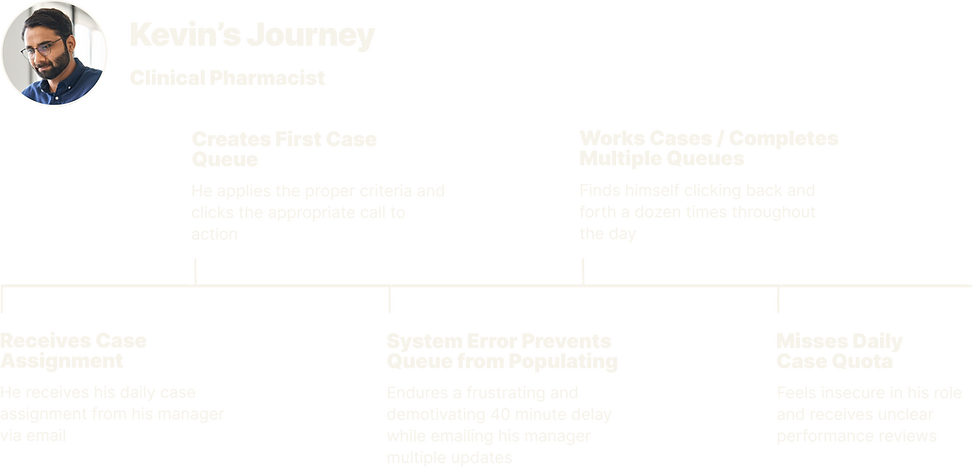
Tech Crashes
Frequent performance issues negatively impacted job performance and reviews
Missed Quota Blues
Ambiguous performance reviews lacked positive reinforcement hurting morale
Too Many Clicks
Creating case queues was constant, tedious, and it haulted momentum
Information Overload
Key tables were difficult to scan due to unnecessary data slowing task times
Key tables were difficult
to scan due to unnecessary data slowing task times
Excess Clicks & Frequent Rebooting
Although our user group was large and specialized, they were in consensus about unnecessary clicks and frustrating tech failures. The missed quotas that resulted were ultimately a business problem, but any resulting drug safety issues for members were a more severe human problem.
I wondered if the subpar UX here ever resulted in real harm, and realized pharmaceutical safety
is truly a wicked problem.

Streamlined Tasks to Reduce Clicks
We solved for clicks by automating as much of the manual case queue creation as possible. "Opportunity Queues" are preloaded, eliminating the need to create those queues manually. For instances where manual queue creation was necessary, we let users select multiple queues to be delivered in a continuous stream, where previously, once a queue finished, users had to click back to home and create a brand new queue.


Streamlining Queue Creation Saving Clicks
Scannability to Cut Task Time
We audited the tables and removed unactionable data. Additionally, we added a numbered indicator to provide pharmacists with more context on the member's claim history. These improvements made the tables more scannable and made it quicker to decide on claims.


Same Mental Models to Speed Adoption
Our strategy was to keep some of the flows feeling very similar to the old experience because users needed to be able to use the product effectively from day 1. The history section is complex and contains a lot of key data about previous interventions, so it made sense to leverage our users existing mental models of the old design patterns and information architecture.


Alleviating Quota Anxiety for Focus
CVS had strict case review quotas for pharmacists, and tech failures and clunky systems hindered their performance. This created frustration and led to ambiguous performance reviews, which caused a dip in morale. Previously, pharmacists had to manually run reports on the number of reviewed cases multiple times a day to make sure they were on track. We saved pharmacists time by eliminating the need to run reports to track progress toward their daily quotas. The opportunity counter sits in their header, tracking their case count throughout the day.

Performance and Savings Gains
Once the new SQM app was live, average case review time decreased from 4.3 minutes to 2.8 minutes within the first 6 months. User feedback attributed this improvement to better claims tables and visual cues that helped them decide on claims more quickly. By the third month, overall quota attainment had increased to 4%. Management attributed this success to preloaded queues and high-performing systems, which decreased pharmacist downtime and increased management's ability to allocate caseloads more efficiently. Finally, executive leadership projected maintenance costs for Retro and CSS to exceed $40 million over the next three years. SQM was estimated to cost a fraction of that.


E2E Enterprise Impact
The SQM project is my most important work thus far because of the indirect but critical outcomes that hinged upon our user group being able to do their jobs well. This is my favorite project that I've worked on because of the impact on people but also because of the business and usability outcomes we drove with the experience we created. I was grateful to design a brand new product and own the whole design process for 13 months as the sole designer on the team. I gained practical experience running the double diamond process end-to-end, including a design studio with a serious group of users who ideated great concepts that ultimately shaped the product. It was a challenge wrangling such a large, segmented user group at first, so I learned to dig a little deeper into the nuances of each user's role before initial conversations to organize the initial calls better. Executing well on a project of this magnitude at CVS was especially important for me because it's a giant enterprise, ranked #4 on the Forbes List. This fortified my confidence to deliver impact on any team, and in any organization. Thanks, Monica!
Process
• Domain Discovery
• User Interviews
• Contextual Inquiry with Think Aloud Protocols
• Research Synthesis
• Stakeholder Management
• Double Diamond
• Design Studio Faciliation
• Concept Testing
• Wireframing
• High-Fidelity Mockups and Prototyping
• Usability Testing
• New Product Training
• Weekly Office Hours
• Designing for Impact
• Product Strategy
• Design Reviews
bottom of page